Motivation for this hack is my unwillingness to suffer the pain of using Windows UI just to access BCC, ACC or other ATG tools requiring non command-line interface.
The credit for finding out about approach is blog post by James McOrmond - VPN over SSH - who is using this neat trick from Linux for quite some time.
The software mentioned https://github.com/apenwarr/sshuttle supposedly works on OS-X, however, it has not been updated for 4-5 years and would not function for me (OS-X Yosemite).
This version seems to work on 10.10 - but Homebrew is better anyway.
Fortunately, in the meantime somebody created brew cask, so to install functioning version run
brew install sshuttleHow it works #
Options available
~  sshuttle
error: at least one subnet, subnet file, or -N expected
usage: sshuttle [-l [ip:]port] [-r [username@]sshserver[:port]] <subnets...>
   or: sshuttle --firewall <port> <subnets...>
   or: sshuttle --hostwatch

    -l, --listen ...      transproxy to this ip address and port number
    -H, --auto-hosts      scan for remote hostnames and update local /etc/hosts
    -N, --auto-nets       automatically determine subnets to route
    --dns                 capture local DNS requests and forward to the remote DNS server
    --ns-hosts ...        capture and forward remote DNS requests to the following servers
    --method ...          auto, nat, tproxy or pf
    --python ...          path to python interpreter on the remote server
    -r, --remote ...      ssh hostname (and optional username) of remote sshuttle server
    -x, --exclude ...     exclude this subnet (can be used more than once)
    -X, --exclude-from ...  exclude the subnets in a file (whitespace separated)
    -v, --verbose         increase debug message verbosity
    -e, --ssh-cmd ...     the command to use to connect to the remote [ssh]
    --seed-hosts ...      with -H, use these hostnames for initial scan (comma-separated)
    --no-latency-control  sacrifice latency to improve bandwidth benchmarks
    --wrap ...            restart counting channel numbers after this number (for testing)
    -D, --daemon          run in the background as a daemon
    -s, --subnets ...     file where the subnets are stored, instead of on the command line
    --syslog              send log messages to syslog (default if you use --daemon)
    --pidfile ...         pidfile name (only if using --daemon) [./sshuttle.pid]
    --server              (internal use only)
    --firewall            (internal use only)
    --hostwatch           (internal use only)
This is example from UAT environment in the clpud.
The externally visible box is uat-nat. If I ssh to this box, I am able to see the uat-mgmt box running BCC (which is otherwise inaccessible). I cannot however create ssh tunnel from uat-nat to uat-mgmt exposing 8080 port on mgmt, because this port would not be allowed for external access.
Instead, I can use the sshuttle to direct all (or some) network traffic from local mac to the uat-nat box:
sshuttle -vr miro.adamy@uat-nat 0/0The -v flag means verbose - you will see the communication in the command line
It asks for 2 passwords:
- first, sudo password on local Mac
- then login password for the user on remote host (unless you have installed public key)
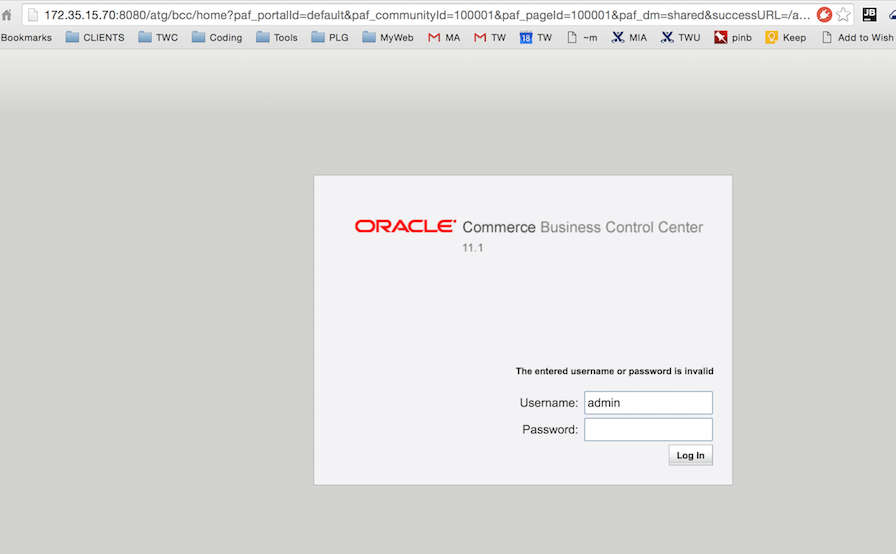
After this, you can access the hosts inside AWS using internal IP address - e.g. access BCC on uat-mgmt :
Keep in mind that only TCP and DNS is redirected, UDP, ICMP etc is not.
Other useful tricks #
Source: http://teohm.com/blog/2012/04/01/using-sshuttle-in-daily-work/
Redirect the DNS as well #
uses ssh_server from ~/.ssh/config
sshuttle --dns -vr ssh_server 0/0Exclude some traffic #
sshuttle --dns -vr ssh_server -x 121.9.204.0/24 -x 61.135.196.21 0/0Redirect ONLY some traffic #
sshuttle -vr ssh_server 121.9.204.0/24 61.135.196.21Few helpers #
(after some search found at )
# sshuttle helpers

# set default SSH server:
#   user@hostname or a host in ~/.ssh/config
TNL_SERVER=default_ssh

# tunnel all traffic including DNS
alias tnl="sshuttle --dns -vr $TNL_SERVER 0/0"

# returns a list of IP addresses from given domain(s).
#
# Examples:
#  dns2ip google.com
#  dns2ip netflix.com movies.netflix.com
#
function dns2ip() {
  dig +short $* | sed "/[^0-9\.]/d" # use sed to remove non-IPv4 line e.g. alias
}

# tunnel specified domain(s) only.
#
# Examples:
#  tnlonly google.com
#  tnlonly netflix.com movies.netflix.com
#
function tnlonly() {
  sshuttle -vr $TNL_SERVER `dns2ip $*`;
}

# tunnel all traffic including DNS, except the specified domain(s).
#
# Examples:
#  tnlbut youku.com
#  tnlbut youku.com weibo.com
#
function tnlbut() {
  sshuttle --dns -vr $TNL_SERVER `dns2ip $* | sed "s/^/-x/"` 0/0; # use sed to append '-x' prefix
}

# vpn to a ssh server.
#
# Examples:
#  vpnto my_office_server      # host in ~/.ssh/config
#  vpnto user@123.123.123.123
#
function vpnto() {
  sshuttle -HNvr $1;
}